Science · Code · Curiosity

Colour Inkscape arrows
This brief blog post explains how to draw and colour an arrow in Inkscape 0.47 and beyond (it should also work with earlier versions).
Having made the change from Windows to Linux, I've also had to make the change from Adobe Illustrator to Inkscape. From what I've seen so far, Inkscape seems able to do most of Illustrator can do, plus a bit extra. However, it has taken me some time to make the change and some tasks that should have been simple have turned out not to be. One example is drawing arrowheads on lines and getting them the right colour.
Adding Arrows
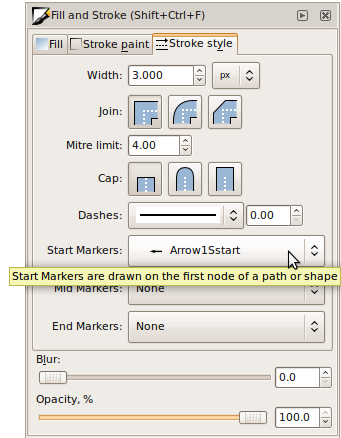
Adding an arrow to a path is relatively straightforward, but while arrows are an Effect in Illustrator, they are a Stroke style in Inkscape. Therefore, to add an arrow in Inkscape:
- Select a path
- Open the Fill and Stroke menu (Shift+Ctrl+F)
- Open the Stroke style tab
- Select which arrow you want from the Start Markers or End Markers menus
Arrow Colour
An arrowhead will be created with same colour as the path stroke. However, if you then change the colour of the path, the arrowhead will not change colour. To change the colour of arrowhead so that it matches the path's new stroke colour requires digging through the menus:
Extensions > Modify Path > Colour Markers to Match Stroke
I'm not quite sure why it's so hidden - I guess the option wasn't in the original program so has been added as an extension.
Comments 8
Leave a comment
Comments are moderated and will appear after approval.
Tnx
Thank you very much for this blog entry.
I changed to linux a year ago and had not the need to make drawings so far but also chose InkScape.
Couldn't find this particular "checkbox" in the preferences but fortunately the internet exists.
Thnks a lot!
Finally I found a helpful post about this "tiny" problem. :)
Thanks, this was extremely useful to me!
Thanks for the tutorial! Being unable to change the arrowhead colour has been driving me absolutely crazy lately. :D
Thanks so much!
I can't thank you enough. I'm managing to draw a figure for my honours thesis thanks to this. THANK YOU!
good stuff, thank you